
Business Owners Can Now Claim Their Listing on US Directory
Owners and authorized staff can now claim their business listing on US Directory for free. Once you confirm your claim, you can add your own photos, set your hours and services, and reply in public to customer reviews.
Until now, we built every listing from public records and the business's own website, and some of those details can go out of date. A claimed listing lets the business keep them current. Below, I explain how to claim your listing and what you can change.
How to Claim Your Listing
- Open your business's page on US Directory and choose "Is this your business?"
- Enter your email address. Any address works here, and we send you a link to sign in.
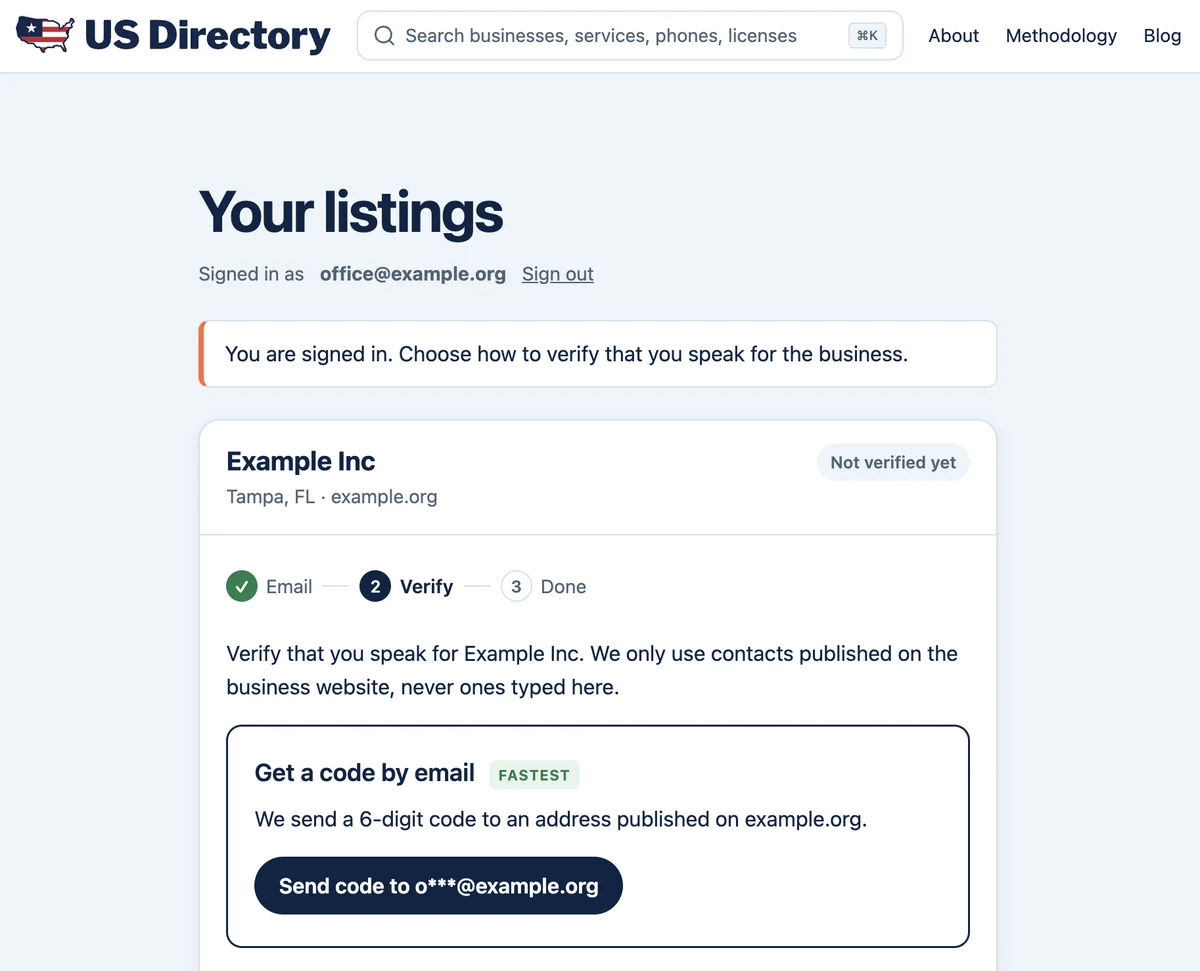
- Open the link and choose how to confirm your claim.
- Once we confirm, the listing appears in your business account, and you can start editing.
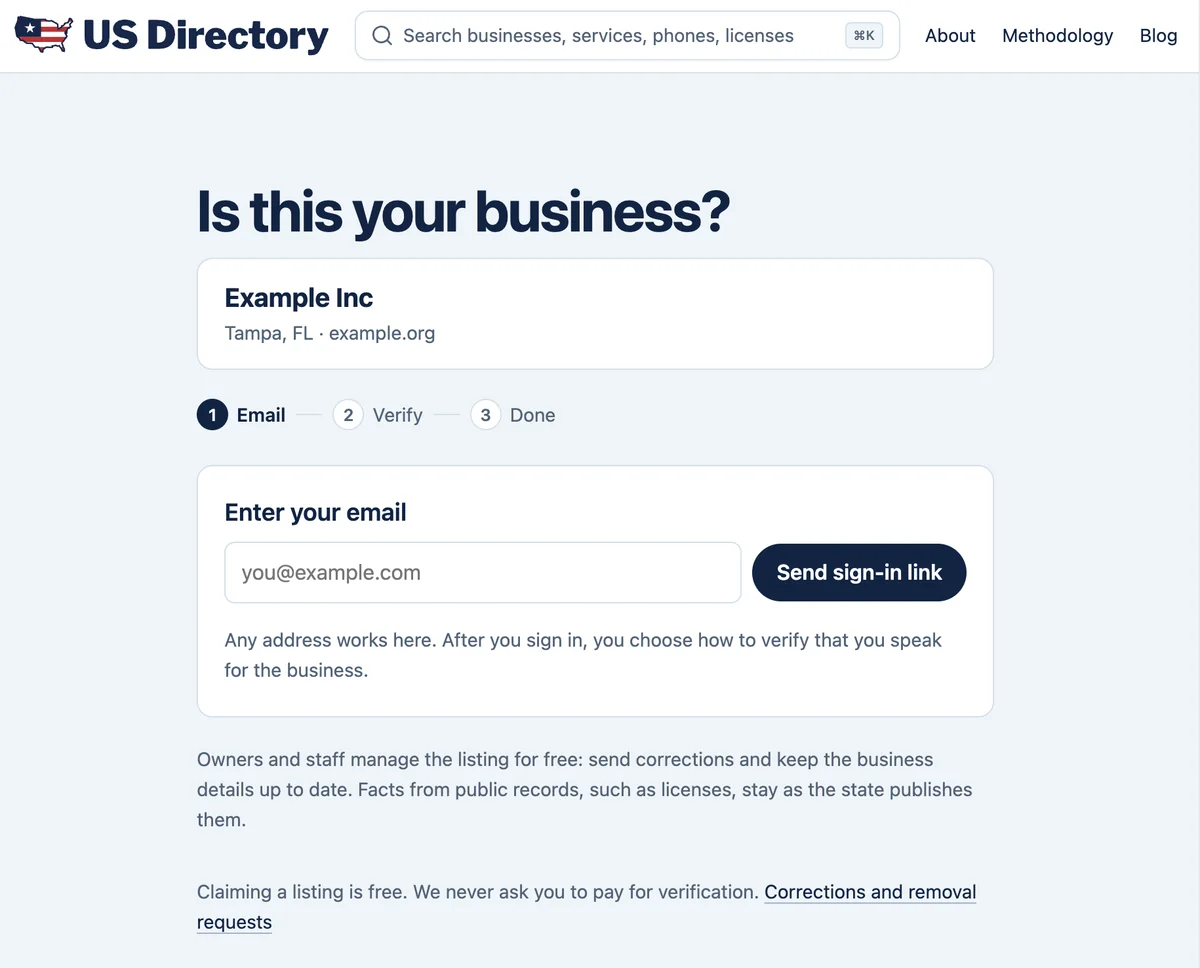
The fastest way to confirm is a code by email. If your website lists an email address at its own domain, such as [email protected], we send a 6-digit code there, and you enter it on the page.
You can also confirm through the website in one of three ways: add a DNS TXT record, upload a file to the site or paste a meta tag into the home page. DNS changes can take up to an hour to show.
If you can't reach that email or the website, ask for a review by a person. Tell us your name, your role and how we can confirm it, such as a Florida license number or a document that shows the business name. We aim to review each request within five business days.
We send the code only to an address published on your website, which makes it harder for someone outside the business to claim it. If the website's domain looks recently registered, we also check the claim by hand. If someone has already claimed your listing and you didn't set this up, send a request the same way, and we'll let the current manager know.
To come back later, sign in on the page for businesses with the email you used. Claiming a listing means you accept our Terms, and our privacy policy explains what we keep when you sign in.
What You Can Change
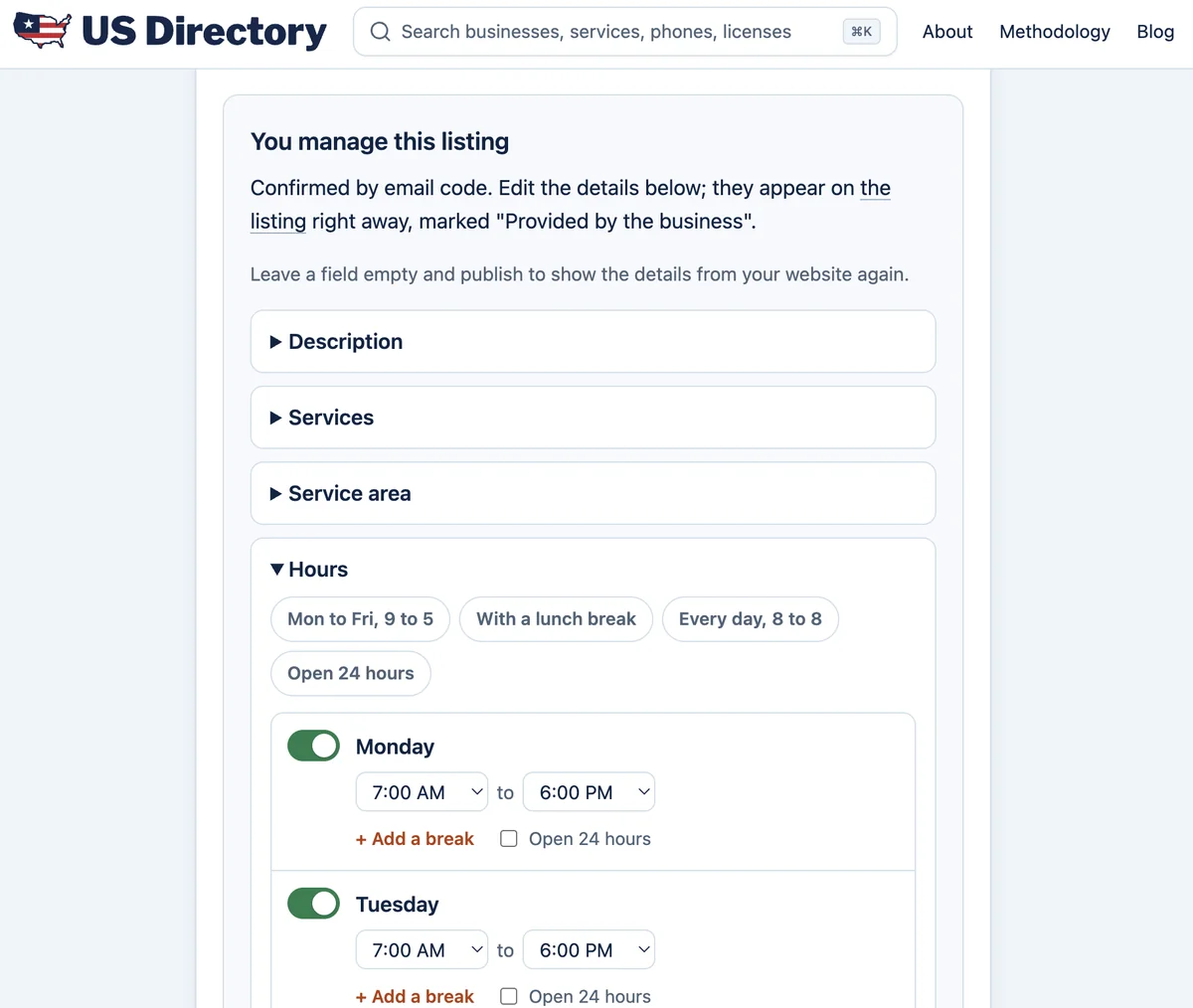
After you confirm your claim, you can edit the listing from your business account, and your changes appear on it right away. You can change:
- Photos. Add up to 10 photos that show your work or your team. They open the listing ahead of the photos we found on your website. You choose the main photo, and you can hide any photo taken from your website. Upload only photos you have the right to publish.
- Description and tagline. Describe what you do and how you work in up to 750 characters. The tagline is a short line of up to 80 characters under your business name, at the top of the listing. It tells customers in a few words what you do, for example "Drain cleaning and water heater repair, same-day visits."
- Hours. Set your weekly hours, lunch breaks, holiday hours and emergency service 24/7.
- Services and service area. List up to 30 services and up to 50 cities or ZIP codes you serve.
- Contact details. Set the phone number behind the call button and the email address customers see.
- Other details. Add your logo, the languages your team speaks, the payment methods you accept, links to your social and review pages, and a link to book online.
If you clear a field, the listing goes back to the details from your website, when we have them.
What You Can't Change Yourself
The license, its number and its status come from the state's records, so you can't change them from your account. If they're wrong, ask the state agency to correct them, and we'll update the listing on our next check. If we matched the wrong record to your business, tell us through the corrections page. The star rating and the reviews come from customers.
To change the business name, website or address, send the change from your account, and we'll check it before it appears on the listing.
The description and tagline can't include links, email addresses or phone numbers. They can call the business licensed, insured or bonded only if our records for it show that, and they can't use the word "certified."
What Customers Will See
A listing that a business manages shows the mark "Managed by the business" near the top. Each section you fill in, such as About or Hours, carries the note "Provided by the business." In the About section, text that still comes from your website is marked "From the company's website." Under the photos, a line says which photos came from the business and which from its website.
The phone number you set also becomes the call button on your business's card in the city list. Your replies appear under the reviews they answer.
Replying to Reviews
When a customer publishes a review of your business, we email you. You can post one public reply to each review and edit it for 24 hours. An edited reply is marked "edited."
If you think a review breaks our rules, you can dispute it within 30 days of publication and tell us why. A person at US Directory reads every dispute and writes back to you. The review stays visible while we look into it. If you say the author was never your customer, we may ask the author for proof, such as an invoice or a receipt.
No business can delete reviews, and we remove them only for the reasons in our review policy. You may invite your customers to write a review, but don't invite only the ones you expect to be happy or offer anything in return: we remove reviews obtained that way. Reviews don't affect where your business appears on US Directory.
It's Free
Claiming a listing is free, and so is everything described here. We never ask you to pay for verification.
If You No Longer Want to Manage Your Listing
You can stop managing the listing at any time from your account. The listing stays on US Directory, built again from public records and your website, and you can claim it later.
If you want your business removed from US Directory, claim the listing first, then email us at [email protected] from the address you sign in with, and we'll remove it. Removing the listing also removes all of its reviews, good and bad. We accept removal requests only from people who have claimed the listing, so a competitor can't simply ask us to take a business down.
Questions and Feedback
If you'd rather not claim your listing, you can still ask us to fix a detail through the corrections page. You don't need to claim the listing to ask us to remove a photo taken from your website.
If something doesn't work or a step is unclear, email me at [email protected]. I especially want to hear from owners who tried to claim a listing and got stuck.